Azure AD Connect is a critical tool that synchronizes your on-premises Active Directory (AD) with Azure AD, enabling seamless identity management across hybrid environments.
However, maintaining the health of your Azure AD Connect Sync is essential for ensuring consistent user experiences and secure access to resources.
We recently got a requirement that if Azure AD connect sync has not happened for 2 hours then it should send an alert.
Prerequisites for this Solution:
Download the script from Git or PowerShell gallery from below links:
Git:
https://github.com/VikasSukhija/Downloads
azureadsyncmonitorandalert.ps1
PowerShell Gallery:
https://www.powershellgallery.com/packages/azureadsyncmonitorandalert
Install-Script -Name azureadsyncmonitorandalert
Update the below section of the script with your own parameters:
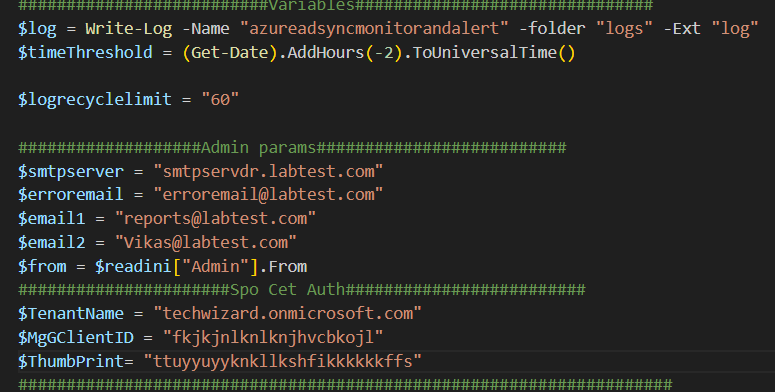
Note: Assumption is you have already registered the APP in Azure AD(Entra), applied required permissions and uploaded the certificate for connection.
It connects to graph as shown below and get OnPremisesLastSyncDateTime, if the OnPremisesLastSyncDateTime and Current time difference is more than two hours then it will send an Alert.
Connect-MgGraph -ClientId $MgGClientID -CertificateThumbprint $ThumbPrint -TenantId $TenantName
Write-Log -message “Loaded All Modules” -Path $log
$syncEvents = Get-MgOrganization
$lastsynctime = $syncEvents.OnPremisesLastSyncDateTime
This script is useful for administrators who need to ensure that Azure AD synchronization is running smoothly and timely.
By setting up this script to run at regular intervals (e.g., via a scheduled task), administrators can be promptly alerted if there are any issues with the sync process, allowing them to take corrective action quickly.
Thanks for reading and downloading…
Tech Wizard
 Tech Wizard