In today’s fast-paced world, businesses are constantly looking for ways to streamline their processes and improve efficiency.
Microsoft’s Power Automate, a powerful workflow automation tool, has emerged as a game-changer in this regard.
With the integration of AI Builder, you can supercharge your automations by leveraging advanced artificial intelligence capabilities.
In this blog post, we’ll delve into the exciting world of AI Builder and show you how to create text using the Chat GPT action.
Problem at hand:
-
Read an email from a mailbox and extract certain word from it.
Based on those words we have to process that email further.
When this Create text with GPT action was not there, we had to use plenty of splits and replace to extract the exact string.
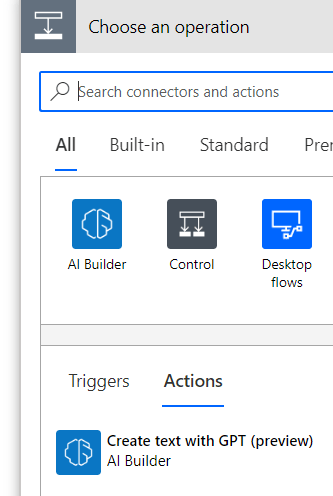
With this action now available, it has become simple to do this JOB.
Note: AI builder is part of Dataverse, and it is by default enabled if you DLP policy is allowing Dataverse.
Here are the simple steps you can do to extract the
- Create a trigger for when email arrives in the mailbox.
- Use TMHTML to Text for message body conversion.
-
Now Use the AI builder Create text from Chat GPT action, type the instructions in simple word as below:
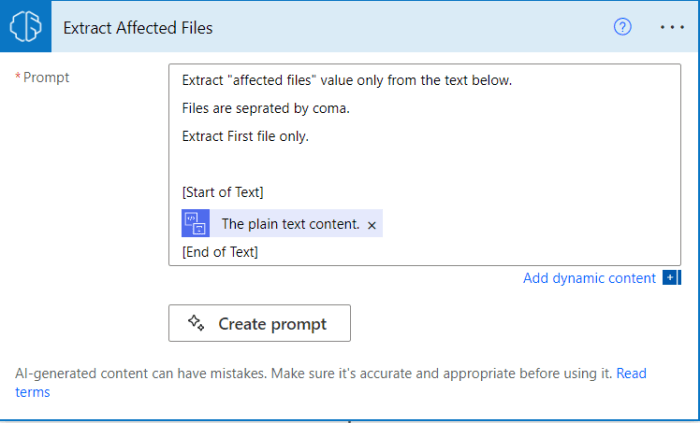
Now when the flow runs it will extract what is required without any complex split or replace functions.
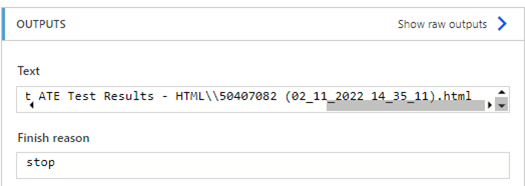
Power of AI is now available in power automate, this is just a start, Microsoft is doing big investments in this area, it will make development rapid.
Thanks for reading …
Tech Wizard
 Tech Wizard