As I am continuing my Python journey so sharing a script that will export the Sharepoint List items to CSV file.
We have seen scripts like these with Powershell but this is for python lovers
Here is the Script that you can download from Github. (Tested on Python 3.8.5)
https://github.com/VikasSukhija/Python/blob/main/ListExportSPO.py
Libraries used:
Demo List:

1. Update the log and variables section that start at line 84
Site Url, List Name, Admin User and Admin password.
# log and variables
log_file = create_file(“logs”, “spo_list_item”, “log”)
report_file = create_file(“report”, “spo_list_item”, “csv”)
site_url = “SiteURL”
sp_list = “DL Modification”
admin_user = “jtechwizard@techwizard.cloud”
admin_password = “password”
2. Update the Section for CSV file at line 103 and item properties at line 108
fieldnames = [‘ID’, ‘Title’, ‘Check’]
writer.writerow({‘ID’: item.properties[‘ID’], ‘Title’: item.properties[‘Title’],
‘Check’: item.properties[‘Check’]})
Now let’s run it Python ListExportSPO.py by changing to the directory
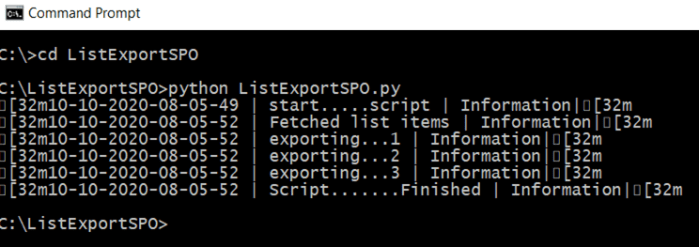
Logs will be created in logs directory and CSV report will be generated in report folder.

Thanks for reading and downloading…
Tech Wizard
 Tech Wizard
Works perfectly! Thank you so much!